Showing posts with label Tech Update. Show all posts
Showing posts with label Tech Update. Show all posts
Wednesday, August 5, 2015
Google Search vs. Apple Spotlight Search: The War Has Begun

For many of you, search is undisputedly the Google search you perform on your phone or PC browser by accessing the website Google.com or maybe some other services like Bing or Yahoo. But the search has evolved from this confined space to give rise to the contextual search and this is the future of search.
In the past Google has tried to do this with the help of Google Now, Apple did the same with Siri and Microsoft is relatively newer with its own digital assistance Cortana which is heavily embedded into Windows 10 and is being billed as the biggest feature if Windows 10.
Recently Google unveiled that its next iteration of Android operating system Android M will be featuring Now on Tap – another form of contextual search that promises to leave other miles behind. With older Google Now, the search engine giant learnt to read your mails, and notify you about your meetings, upcoming flights, package deliveries and more
Well, there have been rumors in the past regarding Apple’s search engine and this got more heat when Apple confirmed that it is having its own Web crawler to look into websites and index their data for it own use.
At last week’s Apple World Wide Developers Conference (WWDC) in San Francisco, Apple unveiled a new intelligent part of the upcoming iOS 9 – new and improved Spotlight. Spotlight is the build-in search tool for iOS that gives you information by “deep searching” apps. Now read the next line carefully: everything that is searched or done in proactive Siri, is done your device and you never leave it. So, what does it mean?
It simply means that Apple is trying its best to keep the users away from the search engines (read Google). Apple has now allowed the developers to “expose” their app’s data for indexing in the Spotlight user searches for the first time in iOS 9. Now users can search for the “Superman” inside the app and Spotlight will take them directly to the IMDb page or other useful cards without leaving the app.
The Spotlight API is a new kind of search engine that has deep searching and access to the apps that are made available for indexing by their makers. So Apple doesn’t want its users to visit the Google search and is trying to provide everything inside the spotlight search. The new Spotlight also uses a number of third-party services like Wikipedia, YouTube, Amazon and Netflix.
With the promise that the user data stored by Spotlight never leaves your device, so with increased privacy concerns, this could be a big thumbs up.
As the history tells, Google is little perturbed by its rivals, but this is something that would definitely bring some worries to Mr. Larry Page.

Create Uncrackable Passphrases that Even NSA Can’t Crack

Did thinking the most secure password takes out the best of you?? And still it seems that it is not good enough. Your first crush’s name might appear safe to you, but is it really?? If your computer be ever attacked or hacked, then it would be going against a supercomputer that could perform more than a trillion guesses per second. It does sound scary.
The simple solution is to leave passwords and go for ‘passphrases’. A passphrase is like an elder brother to password. It is a string of letters or words acting as an encryption key; more longer, thus more secure. So now there is just one problem. Choosing a strong passphrase. Picking your favorite serial’s character catchphrase or Shakespeare’s quote are not good enough when going up against such an adversary. Your documents encryption would be as strong as your passphrase.
Micah lee, a technology expert has developed a method of procuring a password that would be almost impossible to crack for the brightest hackers and could even bring down NSA to its knees. Do not expect a gadget now, you just need a dice and you will get world’s most secure passphrase.
Lee terms it as Diceware technique, based on Diceware word list comprising of 7,776 English words each corresponding to a five digit number. Now just roll your dice and take five random numbers. The word generated from the list would be the first word of your passphrase. Repeat it 5 or 7 times to be on the safer side and make the best passphrase for yourself.
Lee writes at The Intercept
What you’re doing here is generating entropy, extracting true randomness from nature and turning it into numbers.You’ll end up with something that looks like “bleak grout had zen ulcer thorny snag” that you can keep in your wallet and recite over and over again until you have it down. Even though it sounds like a task to remember, it’s a lot more easier than trying to memorize a random string such as d07;oj7MgLz’%v
As per Lee’s calculations
"Using a seven-word passphrase there’s only a one in 1,719,070,799,748,422,591,028,658,176 chance that someone could randomly pick your passphrase from the Diceware word list. Imagining that a computer is making one billion guesses per second of your password- it would still take an average of 27 million years for them to guess your passphrase."
This mathematical approach basically works on the principle of entropy or randomness, which creates more than a trillion trillion possibilities for the hackers to guess for the right passwords.
Well this a long time to keep one’s documents safe. During the times when the password cracking and and cyber security are of utmost importance this Micah Lee surely brings a sigh of relief to the people.
Source: The Intercept
Your WiFi Router Has a Superpower You Didn’t Know
If you are a regular visitor of my Blog, you must have come across our articles like ways to fix your WiFi or the news about the recently released world’s fastest WiFi router. Today we are here with another interesting piece related to WiFi. Do you know that your WiFi router has a secret magical power? Let’s tell you about it in detail.
he electrical engineers from the University of California has found a way by which the number of people in a room could be calculated by the WiFi power measurement. This reminds me of the mobile spying technology used by Batman and Fox in the Dark Knight movie.
“Our approach can estimate the number of people walking in an area, based on only the received power measurements of a WiFi link,” said Mostofi, a professor from the University of California. With this approach, we don’t need any WiFi enabled electronic communication device to count the people
To count the number of people, the researchers put two WiFi nodes located in the opposite directions in a 70-sq-meter area. Now by calculating the power measurement in that particular by those nodes, the number of people were accurately estimated up to nine people- in both outdoor and indoor locations. When people crossed the team between these two nodes, the WiFi signal dropped a bit and vice-versa.

By examining the signal variation and behavior of signals, the researchers were able to derive a mathematical method to estimate the number of persons in that area.
Mostofi said, “This is about counting walking people, which is very challenging, counting this many people in such a small area with only WiFi power measurements of one link is a hard problem, and the main motivation for this work.”
This finding related to WiFi signals could be used in various applications like estimation of people to make smart buildings, air-conditioning capacity etc. Apart from these, this could also be used in security related areas.
Visit this research page link to know more.
Image: Wi-Fi Alliance
The Best Place to Put Your Wi-Fi Router – Explained by Physics

Image: CNet
Electromagnetic waves are the carrier of near about every type of modern day communication systems. They enclose you and your surroundings whenever you make a call, use Wi-Fi or other gadgets. These electromagnetic waves are reflected by the Earth’s upper atmosphere where it becomes a “plasma” at high altitudes. Plasma is a state of matter with interesting properties and show strong reaction to the electromagnetic field. Using this property, at low frequencies, we can bounce the radio signals and thereby extending signal’s range.
Jason Cole, a PhD scholar of Imperial College, London, has studied this plasma-electromagnetic waves’ interaction. He writes that the behavior of intense EM waves and plasma can be predicted using the Maxwell’s equations that date back to the 19th century.
How Maths fixed the Wi-Fi in a flat?
Jason used these equations to improve the Wi-Fi reception in his flat. He explains that the normal wireless router antenna emits EM radiations due to a small current oscillating at 2.4GHz.
In his model, he introduced a similar current and made it to oscillate; the resultant EM waves flow was dictated by Maxwell’s equations. After mapping his flat, he developed a map of the Wi-Fi strength in his flat. As he moved his virtual router, he was able to see the variable signal strength.
The first lesson he learned is pretty much obvious: Wi-Fi router should be kept in line-of-sight to your device.
Further, he found that sometimes signals stop changing and flicker without any particular reason at some places. This happens when Wi-Fi reflections overlap and thereby cancel each other. Thus, it’s the phenomenon of a standing wave. Due to this, dark spots, separated by some centimeters, are created indicating low signal. This phenomenon was recently mapped in 3D by a Wi-Fi enthusiast.
So here we got our second lesson which is a bit more interesting and less obvious: if you are receiving a poor signal at some particular position, you should do a slight change in router’s position. This will produce a significant improvement in signal strength due to the disappearance of the dark spots.
Some more tips to fix-up your Wi-Fi by choosing the best place:
1. Place your router at a central location in your room.
2. Cole said, “All materials reflect a portion of radiation. Some absorb it quite strongly, especially concrete.” So don’t it by walls.
3. Mount the router at some height to get the best results.
4. Water interferes with Wi-Fi signal. So, the signal is seen to get worsened in a crowded room as our bodies are mostly made up of water.
5. Keep the router far from Microwave.
6. Direct your antenna upwards for better horizontal reach.
7. Direct your antenna sideways for better vertical reach.
8. Select the correct channel to fix-up your Wi-Fi.

Based on his findings, Jason made an Android App to answer the question: Where is the best position to place your Wi-Fi router?
These findings may be a bit less exciting, but it confirms the fact that mathematics is a useful tool that solves tough problems and even makes your Wi-Fi signal stronger. 
Via: The Conversation
Linksys Launches Fastest WiFi Router Ever With MU-MIMO Technology
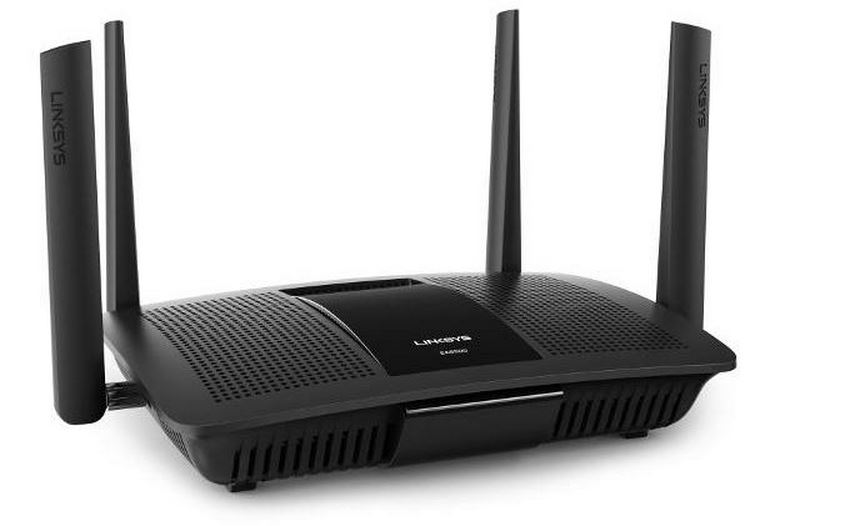 Linksys has launched the very first MU-MIMO (multiple-user, multiple input, multiple output) enabled router. The Linksys EA8500 Max-Stream AC2600 MU-MIMO Gigabit Router is the first Wave 2 enabled router available in the market. Due to the new 802.11ac MU-MIMP finally appearing in chipsets, the Gbps WiFi speeds are now a reality.
Theoretically the devices working with 802.11ac Wave 2 coupled with other Wave 2 enabled devices can reach 7Gbps speeds. These are the ideal lab tests results, but real world speed is actually incredible.
The technology company claims that the Linksys EA8500 router hits the 2.53 Gbps WiFi speeds. This means 1,733 Mbps speed with 5Ghz.
Linksys EA8500 is the first router to use Qualcomm MU/EFX WiFi technology that ensures better performance on a crowded network. The router has an excellent WiFi coverage and stable quality of WiFi signals.
What is this new MU-MIMO WiFi technology?
The Qualcomm MU/EFX 802.11AC WiFi chip supports the MU-MIMO technology that handles WiFi load efficiently and delivered enhanced performance at better data rates to multiple users at a time.
The WiFi routers have more power than the client systems, but it is hardly used at its peak capacity. CNet explains this with a simple example: A three-steam router such as Linksys WRT1900AC has a maximum WiFi rate of 1,300 Mbps, but even the high-end smartphones have maximum WiFi rate of about 400Mbps. When both these devices are connected, the router still uses the complete 1,300Mbps bandwidth and wastes remaining 900Mbps.
With the new MU-MIMO, different WiFi tiers could be sent to multiple devices at the same time to connect them at the speed each device needs. So, all the devices get the right amount of bandwidth they need.
World’s Fastest Camera Captures 100 Billion Frames Per Second

Did any of you guys ever wonder of seeing light as it travels? Well the researchers at Washington University in St. Louis have designed the world’s fastest camera that can capture Light photons.
ihong Wang led a team of biomedical engineers to develop world’s fastest 2-D camera that can slow down the processes to 100 billion frames per second. The current ultrafast imaging techniques could capture up to 10 million frames per second.
There, micromirrors are used to encode the image, then reflect the photons to a beam splitter, which shoots the photons to the widened slit of a streak camera. The photons are converted to electrons, which are then sheared with the use of two electrodes, converting time to space. The electrodes apply a voltage that ramps from high to low, so the electrons will arrive at different times and land at different vertical positions. An instrument called a charge-coupled device (CCD) stores all the raw data. All of this occurs at the breathtaking pace of 5 nanoseconds. One nanosecond is a billionth of a second.
The research featuring in the nature, the team of scientists have used a technology called Compressed Ultrafast Photography and took images of the four physical phenomenon of light: reflection, refraction, non-information (faster than light propagation) and photons racing in two media.
Wang said:
For the first time, humans can see light pulses on the fly. Because this technique advances the imaging frame rate by orders of magnitude, we now enter a new regime to open up new visions. Each new technique, especially one of a quantum leap forward, is always followed a number of new discoveries. It’s our hope that CUP will enable new discoveries in science — ones that we can’t even anticipate yet.
The applications of this super duper fast camera are multi-fold. This high-speed frame rate could be used in astronomy and forensics. Wang and his team complemented and added algorithms to the existing technology known as ‘streak camera’ that measured the intensity variations of light with time in 1-D.
In the CUP technology, an object is photographed with a special lens, which captures the photons from the object and drives it through a tube-like structure to a tiny apparatus called a digital micromirror device (DMD), hosting about 1 million micromirrors. Each micromirror is seven-by-seven microns squared.
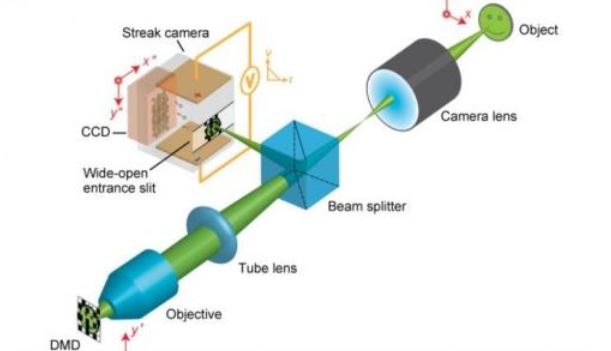
There, micromirrors are used to encode the image, then reflect the photons to a beam splitter, which shoots the photons to the widened slit of a streak camera. The photons are converted to electrons, which are then sheared with the use of two electrodes, converting time to space. The electrodes apply a voltage that ramps from high to low, so the electrons will arrive at different times and land at different vertical positions. An instrument called a charge-coupled device (CCD) stores all the raw data. All of this occurs at the breathtaking pace of 5 nanoseconds. One nanosecond is a billionth of a second.
The CUP technology could be used in integration with the current devices. This advanced technology would also help in the field of medicine and biochemistry. Combining CUP imaging with the Hubble Telescope, we will get both the sharpest spatial resolution of the Hubble and the highest temporal solution with CUP and thus have never seen before images of the universe.
The world’s fastest camera can unfold world’s oldest mysteries. Did you find this intriguing? Tell us in comments below.
Samsung Builds Transparent Trucks To Improve Road Safety

Being stuck behind a large truck in the traffic, especially if it is single lane, is as irritating as it could be dangerous. Reports suggest that in major chunk of road mishaps, trucks had been involved but there were no reforms in the safety measures. The electronics giant Samsung has worked upon the Transparentius concept coined by Russian design house Art Lebedev in making its own trucks safer.
he concept is fairly simple. A camera is put up on the front of the large, slow-moving truck and is connected to video displays on the back. This allows the trailing drivers to see what’s beyond the truck. Thus making it’s safe to overtake the big machine.
Samsung in its transparent trucks has installed four displays on the rear that get the live video feed from the wireless camera at the front, thereby making them transparent for the driver behind. Samsung has already applied for the regulatory approval for its trucks.The company has already tested the prototypes on the Argentine roads and it is working very well. The technology is yet to be commercially available. Samsung calls them Safety Trucks.
Here’s a demonstration video by Samsung of its transparent trucks.
The idea is quite brilliant as it would save many lives. The reckless passing from the trucks that lead to fatal accidents would be drastically reduced if this project comes on road and is adopted by all the truck companies.
One roadblock that could hamper the Samsung Transparent trucks’ commercial success is that this idea though plausible seems a bit uneconomical since installing a wireless camera on the front and four displays on the each truck would not benefit the business in any way.
Successful or not, Samsung’s effort for the peoples’ cause to improve road safety is very well received.

YouTube Announces YouTube Gaming, A YouTube Built for Gamers
 To maintain its user base and stepping into the gaming world, YouTube has stepped into the gaming world with a standalone app and website named YouTube gaming.
In today’s world, gaming has become more diverse than ever and the gaming community has made new formats for a better and immersive user experience. Now there are thousands of gaming videos available online varying from walkthroughs, trailers, spoofs, hacks and more. To deal with this diversity, YouTube has decided to launch a separate and standalone app for gamers called YouTube Gaming.
One of the biggest competitors of YouTube when it comes to gaming videos is Twitch. Just like Twitch, YouTube Gaming too has a dedicated page for a specific game. Each such page has a collection of multiple channels, videos and live streams. You will be able to follow your favorite games and their pages to watch new content and videos.
You need to add a game to your collection and then you can check it out for the latest videos and releases. If you choose to subscribe a channel, you will get a notification as soon as a concerned live stream will be started. You will be in touch with the new games and it’ll help you to make new favorites.
The YouTube Gaming tweeted: We’re connecting you to the games, community and culture that matter to you – by gamers, for gamers.” It also said, “You’ll be able to hang out with your favorite YouTube Creators in our new Live system.”
YouTube Gaming will be available to users this summers – starting from U.S. and U.K. YouTube has also invited the gaming community to connect and give their suggestions.
Get notified about YouTube Gaming and know more here.
A Complete Guide On Facebook Tips And Tricks

Who would have thought something that started as a mischief could go on to become the heart of a billion people’s social lives. Yes I am talking about Facebook. It is nothing short of a phenomenon, connecting people throughout the world and enabling some to rekindle their friendships and some to forge new ones.
ews feed, Timeline, Status, Likes, Shares all these terms have become a part of our dictionary- at-least of mine, they most certainly are. As an active user (or to be more precise- ‘Facebook Addict’ according to my mom) one may often find the need to customize Facebook according to his/her own preferences. So to take your Facebook experience one step further we at fossBytes have compiled some amazing Facebook Tips and Tricks , go ahead and try them out!
Stop Annoying Candy Crush/Game Requests on Facebook:
I am pretty much sure that the first entry in Facebook tips and tricks post must have caught your attention. Trust me there is nothing more irritating than the arghh… moments that you have when your phone buzzes with a Facebook notification and it turns out to be an invitation to play Candy Crush. Lots of abuses and sarcastic memes follow. But it turns out that there is a very simple Facebook tip to stop these notifications. All you need to do is this:
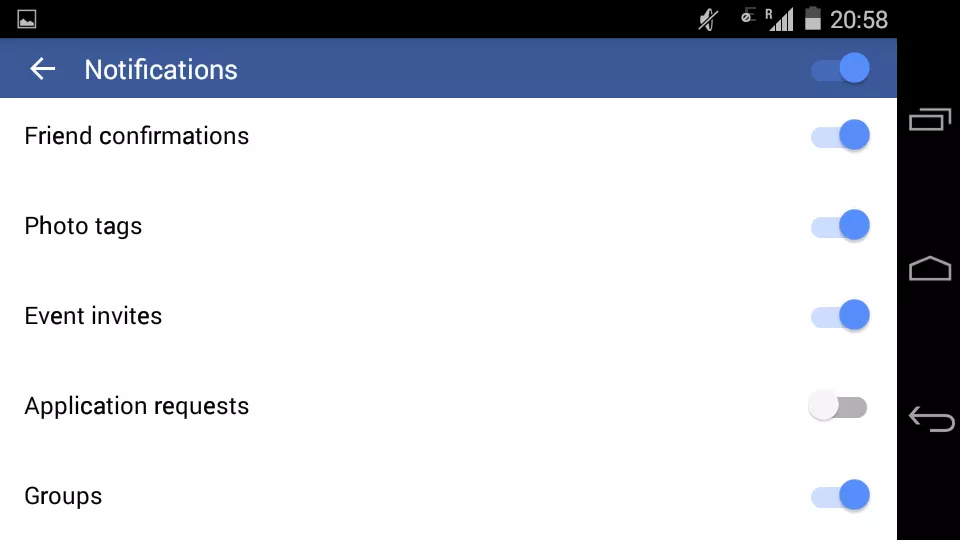
For Android: Open the Facebook Application. Click on the icon having three lines (you will find it in the upper right hand corner). Now click on ‘App Settings’ and open ‘Notifications’ and just uncheck ‘Application requests’.
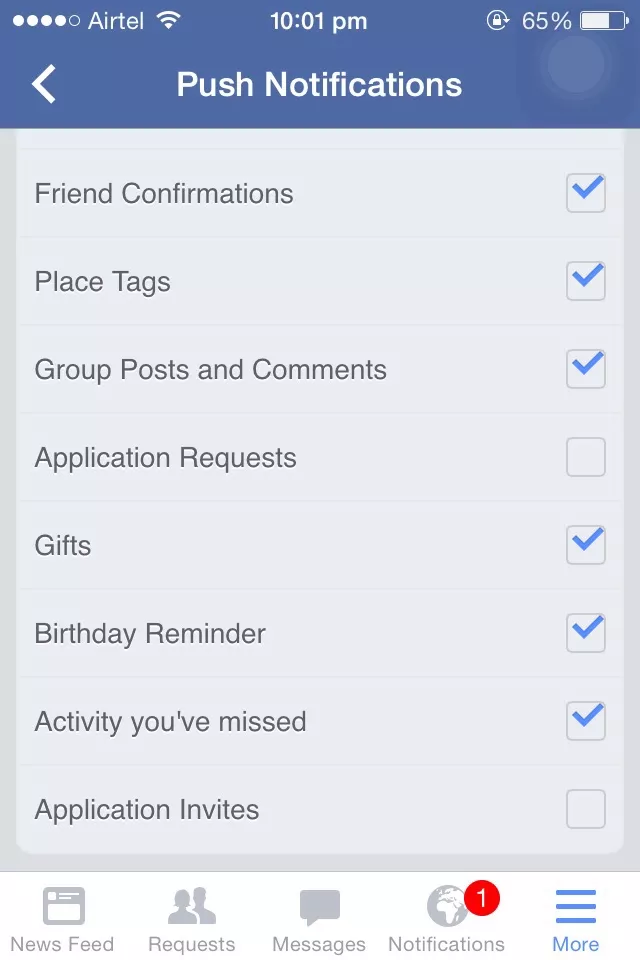
For iPhone: Open the Facebook Application. Go to ‘More’ and then click on ‘Account Settings’. Under ‘Notifications’ click on ‘Mobile Push’ and there simply Uncheck – ‘Application Requests’ and ‘Application Invites’.
Flip Your Facebook Status:
In the mood for a little fun in Facebook tips and tricks article? How about flipping your Facebook Status? Just Click here, Enter the text of your status in the provided text-field and simply copy, paste and post it to Facebook. Enjoy while your friends turn their heads around to read the status.

Invite All Your Friends To Like A Page Instantly:
Instead of clicking Invite for each and every friend of yours which I may add I personally find to be such a dreary task that I’d rather sleep- you can simply do this:
Step 1: Open the FB Page
Step 2: Click on ”Invite Friends To Like This Page”. A pop-up window will open containing the list of people you could invite to like the page.
Step 3: Now press the F12 key to open the Chrome Console Window
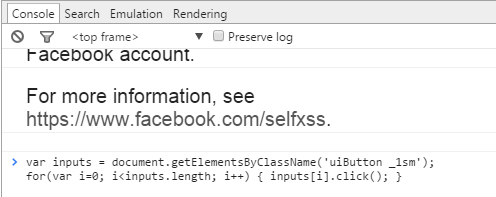
Step 4: Just paste this code in the Console Window and sit back and watch the code work its magic.
Step 2: Click on ”Invite Friends To Like This Page”. A pop-up window will open containing the list of people you could invite to like the page.
Step 3: Now press the F12 key to open the Chrome Console Window
Step 4: Just paste this code in the Console Window and sit back and watch the code work its magic.
Gather All Your Facebook Data
Now you can also grab a copy of your entire Facebook data ranging from the photos, videos that you shared to the messages and chat conversations that you might have had with your friends. In fact you can also recover the messages and photos that you might have ’deleted’. Just do this:
Step 1: Open Your Facebook Account and Go to General Settings.
Step 2: There you will see a link which says “Download a copy of your Facebook data”. Click on it.
Step 3: On the next page click on ‘StartMyArchive’. When asked, Enter your Facebook password. Just a head’s up the process may take quite some time to gather all your data.
Step 4: A download link will be sent to your email id. Log in to your mail account and begin the downloading process from the link.
Step 5: Just Extract/Unzip the downloaded file and you are done.
Step 2: There you will see a link which says “Download a copy of your Facebook data”. Click on it.
Step 3: On the next page click on ‘StartMyArchive’. When asked, Enter your Facebook password. Just a head’s up the process may take quite some time to gather all your data.
Step 4: A download link will be sent to your email id. Log in to your mail account and begin the downloading process from the link.
Step 5: Just Extract/Unzip the downloaded file and you are done.

For more information, Click here.
Limit The People Whom You Want To Chat With:
Often we turn on chat to discover a lot of people online yet we wish to talk to only a select few. Don’t want to make others feel that you are ignoring them deliberately by being online and yet not replying to their messages? Here’s how:
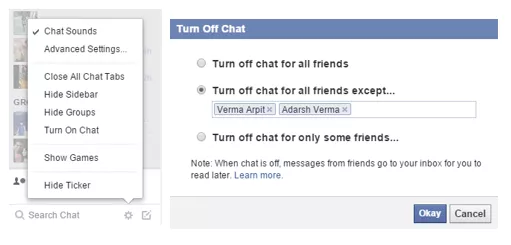
Go to the Chat Bar on the lower right-hand corner of the FB page and click on the ‘Gear Icon’. Then click on ‘Advanced Settings…’ and under the “Turn off chat for all friends except…” field, enter the names of the people with whom you want to chat and then just click ‘Okay’.
Go to the Chat Bar on the lower right-hand corner of the FB page and click on the ‘Gear Icon’. Then click on ‘Advanced Settings…’ and under the “Turn off chat for all friends except…” field, enter the names of the people with whom you want to chat and then just click ‘Okay’.
Hide Status Updates From Specific People:
Suppose you post a status on your relationship with your girlfriend and want to hide it from your parents but not unfriend them, quite a dilemma right? Don’t worry all you need to do is this :
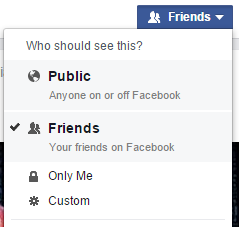
Step 1: On the status bar, Click the Friends button.
Step 2: Under ‘Who Should See This?’ click on ‘More Options’ and then on ‘Custom’
Step 2: Under ‘Who Should See This?’ click on ‘More Options’ and then on ‘Custom’
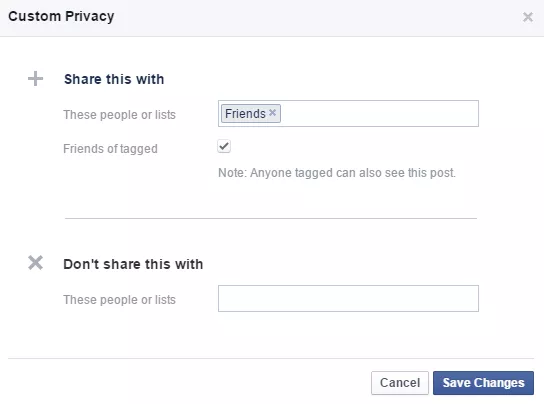
Step 3: A pop-up window will appear and in it under the ‘Don’t Share With’ field, enter then names of the people whom you don’t want to share the status with.
Accept All Friend Requests At Once
Accepting all friend requests one at a time can be quite a cumbersome task! So why not use this Facebook trick:
Step 1: Open Your Facebook Friend Request Page
Step 2: Copy and Paste this code in the address bar of the page.
Step 2: Copy and Paste this code in the address bar of the page.

Step 3: It is advisable to add ‘javascript:’ manually as browsers tend to delete it automatically. Now just press Enter and sit back as the code handles all your friend requests on its own.
Zoom Facebook Photos
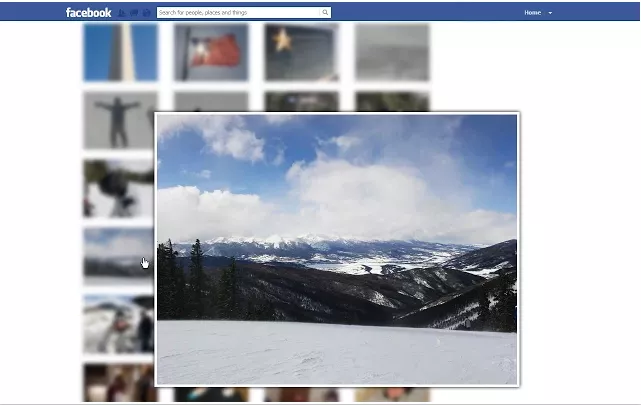
Photo Zoom for Facebook is an excellent lightweight Chrome extension that integrates directly into Facebook enabling you to see the larger images of albums, profile pictures and more by simply hovering over them. Rest assured that it doesn’t access or misuse your Facebook data in any way.
Stop Getting Someone’s Updates Without Unfriending Them
There might be certain people in your Friend list that keep posting worthless or too much content which might tick you off! But you don’t want to unfriend them either. Well, here is a solution to unfollow someone without unfriending them.
Just open the Facebook profile of that person and click on ‘Following’ to unfollow them. Not you won’t get updates from them in your News Feed.

Prevent Notifications After Commenting
Sometimes we grow tired of getting constant notifications of replies from the thread where we might have commented something, could be a wedding anniversary, a birthday wish, some photo of ours etc. To turn off these notifications follow this procedure:

When you get the notification, move your cursor to the right corner of that notification and click on the small cross(x) to ‘Turn Off’ the notification and get rid of it for good.

Facebook Texts
Facebook Texts is a very cool feature that allows you to post on Facebook via a text message. It may come in handy at places where the data service is very poor. Although this feature depends on whether your mobile carrier supports Facebook Texts or not. Oh and do keep in mind that standard messaging rates apply.
In order to learn to set up Facebook Texts, click here.
To see what text messages you need to send to update your account click here.
To see what text messages you need to send to update your account click here.

Log Out Remotely
Suppose you forgot to log out of Facebook when you left the computer lab of your college/school or lost your Android/iPhone device. Now you would gradually begin fretting over someone gaining access to your personal Facebook data. But there is no need to worry just follow these steps to log out remotely from some other device and rest assured that the integrity of your Facebook account is not compromised.
Open Facebook Settings and head over to ‘Security’. There along the ‘Where You’re Logged In’ section click on ‘Edit’. Now choose the device you want to stop and click on ‘End Activity’ to log out remotely.

GIF Support:
Earlier I was going to refer a third party site to post GIF’s on Facebook. But in latest developments, Facebook has gone ahead and added GIF support to its News Feed thereby eradicating the need of any such sites. To post a GIF, you just have to paste a link in status update box. Although if you try to upload a GIF, it will show only image, but by pasting link you will be able to post a GIF on Facebook.

Subscribe to:
Posts (Atom)